TaguchiLab iOS and iPadOS

TaguchiLab for iPad and iPhone.

Design robust experiments, compare factors and levels, and keep project decisions close to the data with a focused Taguchi Method workspace.

Contact Gonzo Studio
TaguchiLab app icon

Explore the app

Choose the workflow that fits your experiment.

From the first factor to the final decision, TaguchiLab keeps every step of the Taguchi Method in one focused workspace on iPad and iPhone.

Plan

Design robust experiments

Capture factors, levels, responses, and experiment structure in a clear mobile workspace.

Analyze

Analyze factor effects

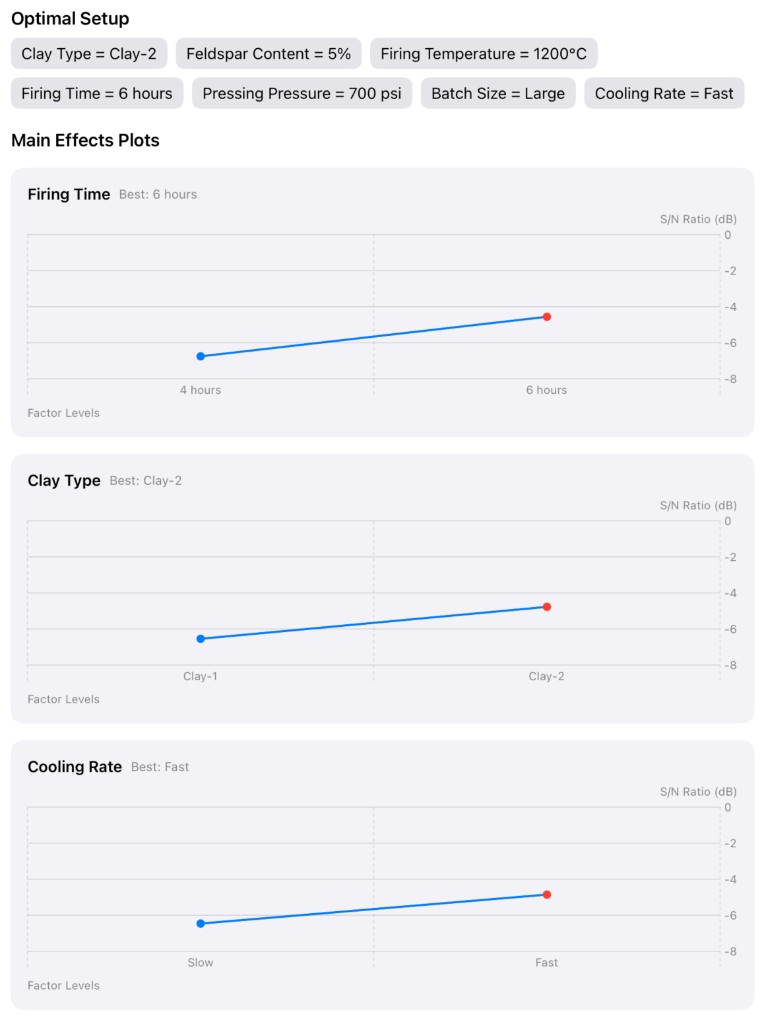
Review computed results and compare what matters before committing to the next test run.

TaguchiLab experiment results with optimal setup and main effects plots

Examples New

Start from ready-made examples

Open the Examples page to browse ready-made experiments like the French fries business case, preview every factor and result, and duplicate them into your own projects.

Explore examples

Carry forward

Save useful projects

Keep experiment projects organized for review, backup, restore, and sync across your devices.

Workflow

Built for practical experimentation.

  1. Create the experiment with factors, levels, and responses.
  2. Record runs and review computed results.
  3. Use the results to guide the next design decision.

Docs

Learn Taguchi with a simple food business example.

Start from zero with a French fries process and see how factors, levels, responses, objectives, and limits become a practical experiment.

Read English docs

Notes and demos

Follow product updates and practical examples.

Browse release notes, demos, learning notes, and roadmap updates for TaguchiLab as the iPad and iPhone app evolves.

Read notes and demos

Privacy

Your experiments stay under your control.

Your experiments are securely stored and synced in the cloud.

Read the privacy policy